4 min. read
Machine Translation with Context and Formality, Using LLMs
Better auto-translations: pick your model, describe your app, set the tone.

Didier Toussaint
Developer
Our auto-translation feature just got better with the integration of Neurooo, our dedicated AI-powered translation service, built to produce high-quality translations using large language models (LLMs).
You can now choose from several AI models for auto-translating your projects, with added support for project context and formality, ensuring more accurate and consistent translations.
Neurooo replaces our previous (experimental) OpenAI integration, while our existing DeepL and Google Translate integrations remain unchanged.
Models Available
We’ve handpicked three models based on our team’s experiments and the models’ adequacy for translation tasks:
- OpenAI - GPT-4o
- Anthropic - Claude Sonnet
- DeepSeek - V4 Pro
We will continue testing other models and add the best ones over time.
How to Enable Neurooo in Your Project
Log into your account and access your project’s settings page.
In the Auto-translation section, enable “Auto-Translate”, then select one of the Neurooo options for your target language(s).
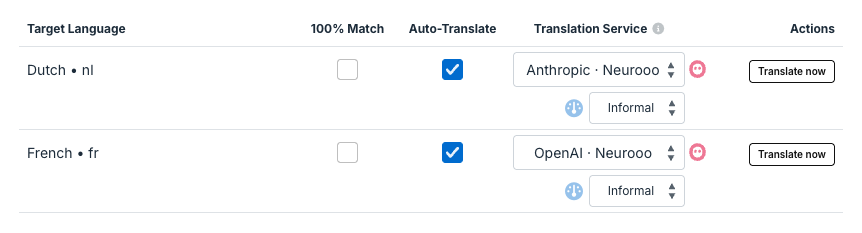
As before, the “Translate now” button allows you to automatically process all untranslated keys.
We still strongly recommend inviting human teammates to review automatic translations and polish them before deployment, to ensure the best quality.
Already using our previous OpenAI integration?
Your projects are automatically migrated to the new “OpenAI · Neurooo” option, which uses GPT-4o, a more capable model than our previous OpenAI integration. No action required!
Project Context
This integration also introduces a new project context field in the Auto-Translation settings.
Use this field to describe your application in a few sentences: what it does, who it is for, any terms that should remain untranslated, or a specific tone of voice.
This will help Neurooo produce more accurate and consistent translations for your project.
Formality
The new Neurooo options let you choose the level of formality (informal, formal, or automatic) for each target language.
This is particularly useful for languages that grammatically distinguish between formal and informal address, such as French, German, or Japanese. When set to automatic, Neurooo will infer the right tone from your project context.
Why Neurooo?
Our team built Neurooo to provide us with a single, reliable interface to use LLMs for translation. This allows us to test and select the best models available, and swap or upgrade them over time without our users having to change anything in their projects.
LLMs are trained to understand and generate natural language more broadly than translation-specific services such as DeepL and Google Translate. This makes LLM-based translation better at nuance, tone, and idiomatic expressions.
Any questions? Feel free to write us.